
When you study with us, MyCG will be one of the key areas you use.
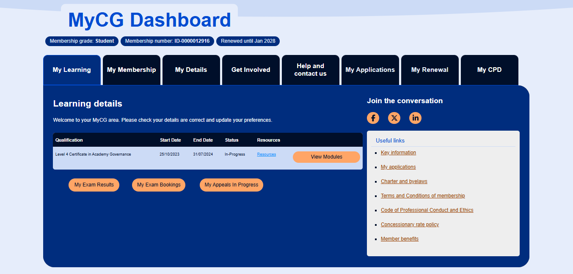
Select the list items below to learn more:
-
Update your communication preferences
-
Register for exams
-
View and manage your invoices
-
Update your contact details
-
View your exam results
-
Access selected study resources.
-
Select 'Login’ at the top right of the CGI website.
-
Enter your username and password. These are the same details you used when you first registered as a student.
-
If you have forgotten your password, enter the email address you used as a username and choose the ‘Forgotten my password’ link to reset it.
If you need any help, please contact our enquiries team at enquiries@cgi.org.uk.
Check that your personal details in MyCG are correct, especially your email address. Throughout your studies, please remember to keep your contact information up-to-date so we can stay in touch with you.
MyCG Resources
This tab provides information about the study text for your module.
As your are studying the International Finance Administration or the Advanced Certificate in Corporate Governance, an e-copy of your study text is included in your registration fee and available in your MyCG resources.
For each exam session, we publish the exam paper, the mark scheme used for assessment and the examiner’s report.
You can access these documents through MyCG as part of your exam preparation.
You can access a range of past webinars which cover topics such as exam preparation and subject-specific guidance. If any new webinars take place throughout the year, we will send you an email to join these live. All webinars contain captions.

Staying in touch

Communication preferences
